


Researched & Compared · Updated August 10, 2026
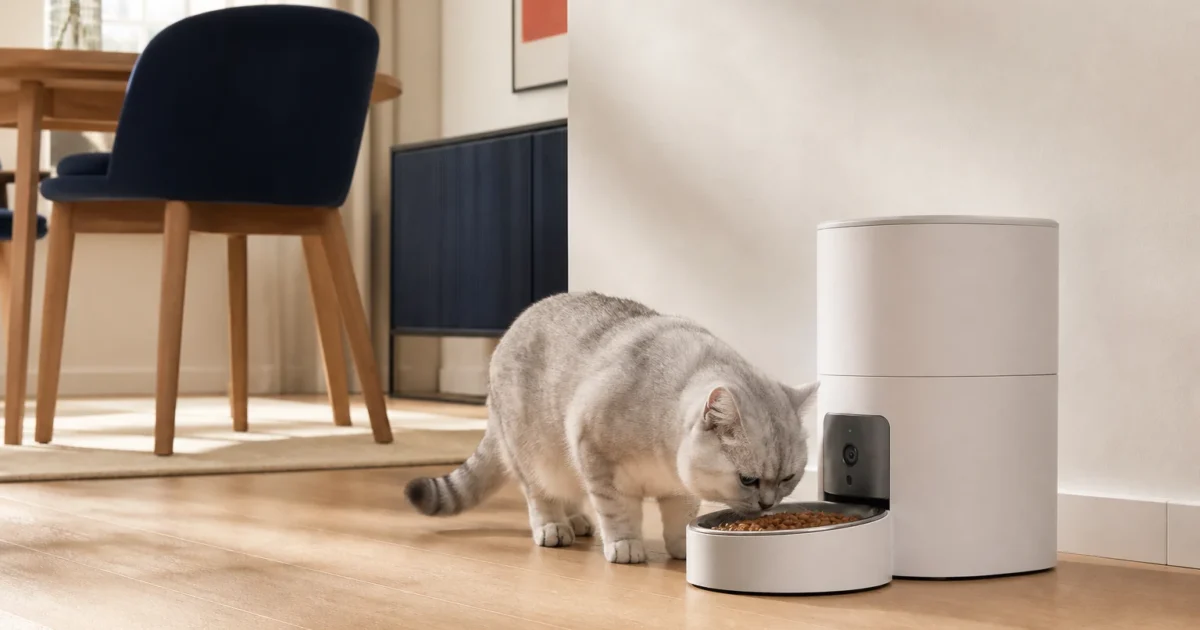
An automatic feeder with a camera can answer a useful question: did a cat actually approach the bowl after food was dispensed? The better models combine a clear bowl-level view with reliable schedules, sensible privacy controls, local or cloud recording options, and feeding functions that continue when Wi-Fi fails.
Transparency: MeowBay compared current manufacturer specifications, manuals, storage and subscription disclosures, privacy controls, capacity, backup behavior, cleaning, and multi-cat limitations. We have not hands-on tested these feeders, audited their apps, or independently validated facial-recognition or encryption claims. Clearly labeled Amazon and PETLIBRO buttons are paid affiliate links; MeowBay may earn a commission at no extra cost to you. Other manufacturer and source links remain unpaid. Merchant availability does not determine editorial ranking.
As an Amazon Associate I earn from qualifying purchases. Prices and availability can change.
The short answer
Best straightforward camera-feeder setup: PETLIBRO Granary Smart Camera Feeder. Its documented 1080p downward-facing camera, 145° view, night vision, two-way audio, 5-liter hopper, microSD option, and app alerts cover the features most households will actually use.
Best for compact AI-assisted meal tracking: PETKIT YumShare Solo 2. Best for two dry-food types: PETKIT YumShare Dual-hopper 2. Best wide-view dual-bowl option: WOPET Heritage View HV10DP.
A camera does not stop food stealing, guarantee the intended cat ate the measured portion, replace a sitter, or turn a shared bowl into individualized feeding.
Who should skip a camera feeder?
Skip the camera premium if you only need predictable portions and can observe meals at home. A simpler offline feeder may be easier to maintain. Also skip a shared camera feeder when one cat guards food, cats need different diets, or individual intake matters medically. In those homes, identity-controlled or physically separate stations solve the real problem more directly.
If appetite, weight change, vomiting, or a prescription diet is involved, ask your veterinarian to set the feeding plan. A video timeline is context—not a diagnosis or a verified calorie record.
How we compared camera feeders
We prioritized bowl visibility over decorative app features. The criteria were: camera resolution and angle, night viewing, recording and subscription rules, camera-off controls, meal scheduling, offline and backup behavior, hopper capacity, food compatibility, cleaning, app alerts, and whether multi-cat claims describe observation or true access control.
We did not assign numeric scores. Specifications can describe what a device is designed to do, but they cannot establish long-term reliability, app quality, recognition accuracy, or real portion consistency without independent use. Those uncertainties remain visible in every pick.
Quick comparison
| Model | Best for | Camera & storage | Feeding setup | Main limitation |
|---|---|---|---|---|
| PETLIBRO Granary Smart Camera | Balanced everyday monitoring | 1080p, 145°, night vision; microSD and optional cloud features | 5 L; dry food; single or dual bowl | No individual cat identification |
| PETKIT YumShare Solo 2 | Compact AI-assisted tracking | Live view, night monitoring, event timeline; some replay services paid | 3 L; dry food; single bowl | Recognition does not control bowl access |
| PETKIT YumShare Dual-hopper 2 | Two dry-food types | Live view, recognition, before/after bowl images; replay subscription disclosed | 5 L split hopper; single bowl | Two hoppers are not two protected feeding stations |
| WOPET Heritage View HV10DP | Wide view and two bowls | 1080p, 160°, night vision; microSD up to 256 GB | 6 L; dry food; dual bowls | Wide room view records more of the home |
Best overall for straightforward monitoring
1. PETLIBRO Granary Smart Camera Feeder
PETLIBRO documents a 1080p camera with a 145° wide-angle lens, infrared night vision, motion and sound alerts, two-way audio, and a downward-facing view intended to keep the bowl and approaching pet in frame. The 5-liter dry-food hopper supports scheduled meals, while app alerts cover low food, low backup power, and food jams.
The strongest practical detail is storage choice. PETLIBRO lists microSD recording up to 128 GB and optional video-cloud plans, while basic feeding and live monitoring functions remain available without a cloud subscription. That makes it a sensible starting point for buyers who want meal confirmation without committing every recording to a paid plan.
- 1080p bowl-level view with night vision
- 145° lens, motion and sound alerts
- MicroSD recording plus optional cloud plans
- 5-liter hopper and battery-backed scheduled dispensing
- Dry food only
- Camera observation is not identity control
- Dual-bowl version still allows food stealing
- Cloud-plan pricing and regional bundles can change
The Amazon link is for the PLAF203 single-tray version; select a matching configuration before buying.
Best compact option for AI-assisted tracking
2. PETKIT YumShare Solo 2
The 3-liter YumShare Solo 2 is the most compact option here. PETKIT says its camera can build a visual meal timeline, recognize up to 15 pets, track visits separately, monitor food left in the bowl, and pause a dispense when a user-set bowl limit is reached. It also documents two-way audio, privacy scheduling, a one-tap camera-off control, dual-band Wi-Fi, and scheduled feeding that continues offline.
Those are useful observation features, but the distinction is important: facial recognition records which face approached; it does not lock the bowl to that cat. MeowBay has not independently measured recognition accuracy, verified the encryption implementation, or tested how well the system distinguishes similar-looking cats.
- Compact 3-liter design
- Per-pet visual timeline and food-left detection
- One-tap camera off and scheduled privacy periods
- 2.4 and 5 GHz Wi-Fi; saved schedules continue offline
- Dry food only
- Some video services require in-app purchase
- Recognition does not stop another cat eating
- Manufacturer AI and encryption claims are not independently audited here
An exact Amazon listing for this reviewed model has not been verified.
Official product pageOfficial user manualBest for combining two compatible dry foods
3. PETKIT YumShare Dual-hopper 2
The Dual-hopper 2 expands the PETKIT camera system to a 5-liter split hopper. Each compartment can hold a compatible dry food or freeze-dried component, and the app can schedule portions from each side. PETKIT also documents facial recognition for up to 15 pets, live monitoring, two-way audio, leftover-food detection, low-food alerts, and backup dispensing when mains power fails.
This model is useful when one cat’s meal intentionally mixes two dry foods. It is not a way to feed two cats separately: both hoppers dispense into one accessible bowl, and the camera cannot physically prevent the wrong cat from eating. PETKIT also states that video replay requires a subscription, so compare the current free and paid plan before purchase.
- 5-liter capacity split across two hoppers
- AI-assisted per-pet activity records
- Before-and-after bowl images and leftover detection
- Dual-band Wi-Fi and battery-backed schedules
- Dry and compatible freeze-dried food only
- Video replay subscription disclosed
- One bowl is not individual access
- Larger footprint than the Solo 2
An exact Amazon listing for this reviewed model has not been verified.
Official product pageOfficial user manualBest wide-view dual-bowl option
4. WOPET Heritage View HV10DP
WOPET’s Heritage View dual-bowl model combines a 6-liter hopper with a 1080p camera, 160° viewing angle, night vision, four-times digital zoom, two-way audio, and microSD support up to 256 GB. The official page lists both 2.4 and 5 GHz Wi-Fi, up to 10 scheduled meals, adjustable camera viewing, low-food alerts, and app control that can switch the camera off.
This is the most room-oriented view in the comparison and the only listed pick built around two bowls. That can suit two compatible cats eating the same dry food, but a splitter divides output—not access. The wider view also captures more of the surrounding room, so camera position and privacy settings deserve extra attention.
- 1080p, 160° view and night vision
- MicroSD support up to 256 GB
- Large 6-liter hopper with two stainless-steel bowls
- Camera-off privacy setting and battery-backed feeding
- No identity-controlled access
- Two cats must share one food and schedule
- Wider view includes more of the home
- Local availability and support vary by market
An exact Amazon listing for this reviewed model has not been verified.
Official product pageOfficial support centerWhat a feeder camera can—and cannot—tell you
It can show whether a cat approached
A bowl-level camera can confirm that a cat appeared near a scheduled meal, whether food was visibly dispensed, and whether obvious leftovers remain. Night vision and event clips make this more useful when the meal happens while you are asleep or away.
It cannot prove exact intake
Video does not weigh what entered the cat. A cat may take a few bites, move kibble out of frame, return later, or trade places with another cat. Even a manufacturer’s AI estimate should be treated as a trend signal unless you have independently compared it with weighed food and observed meals.
It does not make a shared feeder fair
Facial recognition, two bowls, and two hoppers solve different problems. Recognition labels an observed pet; two bowls divide one dispense; two hoppers combine food choices. None physically reserves a portion for one cat. For food stealing or different diets, compare separate and identity-controlled feeder setups.
Built-in camera or separate pet camera?
| Choice | Advantages | Trade-offs | Best fit |
|---|---|---|---|
| Camera built into feeder | Meal-level angle, one app, feeding alerts tied to the device | Fixed location; camera and feeder share one ecosystem | You mainly want to confirm meals |
| Ordinary feeder + separate pet camera | Flexible angle, wider room view, camera can outlast feeder | Two devices, two apps, events may not align | You want room monitoring as well as feeding |
| No camera | Lower cost, fewer accounts, simpler maintenance | No remote visual confirmation | You can observe meals at home |
Privacy and account-security checklist
- Check the field of view. Aim at the feeding area, not bedrooms, work screens, doors, or spaces where visitors expect privacy.
- Understand free versus paid storage. Confirm what live view, event clips, replay, downloads, and retention require today.
- Prefer explicit camera controls. Look for an obvious camera-off state, monitoring schedule, and status indicator.
- Use a unique app password. Enable multi-factor authentication if the current app offers it, and remove household members who no longer need access.
- Keep firmware and the app updated. Retire a connected feeder if security support ends or the app is abandoned.
- Review sharing before adding users. A family account can expose both the live view and feeding controls.
Manufacturer pages describe their own privacy and encryption features. MeowBay has not performed a security audit, penetration test, or data-retention review of these services.
What to verify before buying
- Your food fits: all four picks are dry-food feeders; check the current kibble-size range for the exact model.
- Schedules survive an outage: confirm batteries are installed and whether only dispensing—not the camera—continues on backup power.
- The bowl is visible: use a level floor and check that your cat’s head does not block the entire camera during meals.
- Cleaning is realistic: identify which bowl, tank, rotor, and outlet pieces detach and which cannot be submerged.
- The app works in your market: verify local availability, warranty, cloud plan, app-store support, power adapter, and return policy.
- You have a human backup: test several full days before travel and arrange someone who can check the cat, water, litter, and feeder in person.
Frequently asked questions
Is an automatic cat feeder with a camera worth it?
It can be worth the premium when you regularly miss scheduled meals and want bowl-level confirmation. It is less valuable when you feed at home, need no recordings, or the household problem is food stealing rather than visibility.
Do camera feeders work without Wi-Fi?
The reviewed manufacturers say saved schedules continue offline on the listed models. Live view, remote changes, notifications, and cloud recording require a working network. Backup batteries may keep dispensing while disabling the camera.
Can a camera feeder tell which cat ate?
PETKIT says its YumShare AI can distinguish registered pets and create individual records. MeowBay has not independently tested that accuracy. More importantly, recognition does not stop another cat from reaching the bowl.
Do I need a subscription?
Not for basic scheduled feeding. Recording and replay rules differ: PETLIBRO lists microSD and optional cloud plans; WOPET lists microSD storage; PETKIT discloses that some services and video replay require a subscription. Check the current plan before purchase.
Can I put wet food in these feeders?
No. The four compared models are designed for compatible dry food. For timed wet meals, use the dedicated wet-food automatic feeder comparison.
Which camera feeder is best for two cats?
For two calm cats sharing the same dry food, the WOPET dual-bowl or PETLIBRO dual-bowl configuration may be convenient. If one steals food, eats faster, or needs a different diet, use separate or access-controlled stations instead of relying on the camera.
Sources and verification
- PETLIBRO Granary Smart Camera Feeder — official product page
- PETLIBRO UK Granary camera-feeder specifications
- PETKIT YumShare Solo 2 — official product page
- PETKIT YumShare Dual-hopper 2 — official product page
- WOPET Heritage View HV10DP — official product page
Editorial note: specifications, firmware, subscriptions, prices, bundles, stock, and country support change. Sources were checked August 10, 2026. Confirm the exact model and local terms before buying. Clearly labeled shopping buttons may be affiliate links; source and manufacturer links are not paid. Editorial conclusions remain independent.