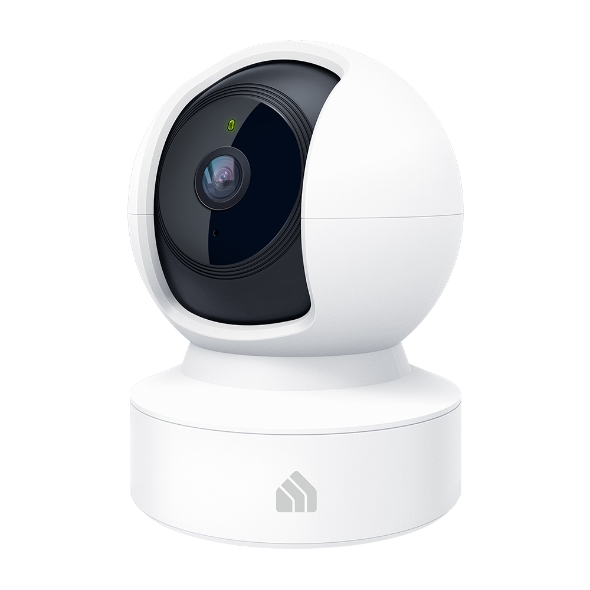
Kasa EC70 Review for Cats: Simple Check-Ins and Local Recording
Written by Maya BennettCat Product Research Editor at MeowBay··
9 min read ·Content updated:
Research-Based
Disclosure: MeowBay may earn a commission from clearly identified affiliate links, at no extra cost to you. Ordinary source and manufacturer links are not paid, and editorial conclusions remain independent.
Short answer: Kasa EC70 is a candidate for simple indoor cat check-ins and local recording, provided you are comfortable with its app and the exact hardware version on sale. It is not a verified individual-cat identification system. Compare your complete setup cost before calling it a budget winner.
Research-based guide. We reviewed manufacturer specifications and purchase information on September 13, 2026. We have not hands-on tested these cameras. Features vary by hardware version, region and firmware.
Affiliate disclosure: MeowBay may earn a commission from paid links at no extra cost to you. As an Amazon Associate, we earn from qualifying purchases.
The manufacturer documents 1080p video, pan and tilt, motion tracking, night vision, two-way audio and motion or sound notifications. A microSD card is purchased separately for local recording. Optional Kasa Care cloud services depend on region and plan.
That makes the buying question straightforward: do you want to open an app and check the room, or do you need a saved timeline to review later? Set up and verify the second function explicitly. A working live stream alone does not confirm that a useful history is being recorded.
Check the hardware version, not just the name
EC70 has several revisions. The manufacturer’s V1 page is marked End of Life, and published storage limits differ between versions. Confirm the hardware label, current support information and compatible card size for the unit you will receive. Do not copy a storage limit from another EC70 revision.
When ordering, inspect whether the listing is for a single camera or a multipack, new or renewed stock, and the intended sales region. The Amazon link below points to a verified EC70 product page; it does not guarantee which hardware revision a seller will ship.
Where a simpler camera is enough
If your question is whether your cat is resting in the living room, begin with a stable location and a clear view. You may not need automated summaries or an elaborate smart-home routine. A plain check-in can be useful when it supports an existing care arrangement.
If your question is which of two cats ate from a particular bowl, the challenge is different. Frame the bowl and the approaching cat clearly, and inspect the footage yourself. Motion tracking and sound alerts are not proof of individual identity or how much food was consumed.
Recording and ownership costs
Compare the device, suitable memory card, mounting needs and any cloud service you plan to keep. For two rooms, compare two complete setups rather than one advertised camera price. MeowBay does not publish a fixed Amazon price or claim this model is the cheapest option.
Think through how you will retrieve a clip before an incident matters. Find the playback timeline, save a sample and check that the timestamp makes sense. If the camera is unplugged, moved or disconnected, recheck the settings and recent recordings rather than assuming everything resumed correctly.
Practical limitations in a cat household
A doorway or furniture can hide your cat despite a wide rotation range.
A curious cat may move a poorly secured camera or reach its cable.
Sound notifications may be unhelpful in a busy room; check the actual alert pattern.
A recording does not replace someone who can visit and act.
Place the camera where it helps your question while respecting household privacy. Tell visitors or carers when monitoring is in use, and review who has access to the account.
When to compare another camera
Read our Tapo C260 review if you want to examine a higher-resolution alternative. Read the PETLIBRO Scout review if pet-focused activity organization is your priority. Decide from requirements first; a longer feature list does not automatically justify replacing a camera that already works for your routine.
Match the EC70 hardware version to the instructions
Preserve a photo of the product label and use the matching regional support page. A familiar model name does not establish identical storage limits or software features.
Decision or record
How to apply it
Identity
Model, hardware version, region and firmware shown on the device or app.
Recording
Supported card, selected recording mode and the exact functions included without a plan.
Verification
A recorded ordinary event successfully found and played back from the intended storage.
When a seller description and manual conflict, ask support before buying accessories. Keep uncertain features out of the purchasing comparison rather than treating the most generous listing as the specification for every EC70.
Frequently asked questions
Can EC70 tell my cats apart?
We have not verified named individual-cat recognition for this model. Do not purchase it on that assumption.
Is a subscription compulsory?
Local recording is a documented option. Check which extras require a plan in your region and confirm the recording setup after installation.
What is the most useful first test?
Record an ordinary period while you are home, then retrieve it and compare the view with what happened. This reveals framing and recording problems before you depend on remote check-ins.
Keep the hardware version attached to every storage claim
On the EC70 V4 page rechecked November 2, 2026, TP-Link lists 1080p video and a separately purchased microSD card up to 256 GB. That is a V4 specification, not a promise for every unit sold under the EC70 name.
Save the actual delivered hardware label and use its matching support information. If a seller cannot establish the revision relevant to your requirement, keep that uncertainty in the purchase decision before buying a card.
Decide which ordinary task needs a camera
A simple room check
If you want to see whether the cat is resting in an accessible area, begin with a suitable supported view. Include the floor route and ordinary hiding places without treating a hidden cat as a camera failure. A rotating lens has only one direction at a time.
Keep the human care plan independent. Seeing the room cannot refresh water, clean litter or assess a health concern directly. Identify who can visit when the view leaves uncertainty.
A past event
If you need to know what happened earlier, configure the wanted recording mode and retrieve a sample. A working stream today does not establish a saved history yesterday. Check dates and timestamps so the right period can be found.
For a food question, inspect whether the actual bowl and identifying cat are visible. Motion in the area is not necessarily eating, and an empty shared bowl does not establish individual intake.
Estimate retention only with stated assumptions
Card capacity and retained time are different quantities. A planning estimate needs an assumed average data rate and must leave room for actual formatting, overhead and the selected recording behavior. Do not turn a capacity label into a guaranteed number of days.
A pure arithmetic example
Suppose an imaginary recording stream averaged 2 megabits per second and could use 32 billion bytes of storage. Multiplying bytes by eight and dividing by the data rate gives 128,000 seconds, or about 35.6 hours, before other allowances.
The assumed 2 Mb/s is not a measured EC70 result or a published device setting in this guide. Variable recordings and real available space can differ. The example simply shows why capacity alone cannot predict retention.
Check the actual usable history
Use the supported card and recording mode, then inspect the available timeline over ordinary use. Keep the observed period with the settings and date. Do not present that household observation as a guaranteed result for every owner.
Export important material before it is overwritten under the normal recording behavior. If troubleshooting requires formatting or resetting, preserve needed footage first through the supported route.
A first-use playback record
Field
What to keep
Identity
EC70 hardware version, region and current instructions.
Storage
Supported card, recognition status and selected recording mode.
Ordinary event
Time and harmless action observed while someone is home.
Playback
Actual retrieved segment, useful view and any gaps.
Export
Supported way to preserve a relevant clip for later.
One successful record checks the configured arrangement at that time. Recheck relevant functions after a storage or recording-setting change, and keep uncertainty visible when an event was outside the view.
Compare complete costs without assuming the lowest price wins
List the actual camera offer, compatible card, supported mounting and any service you want. For two locations, count two complete arrangements and verify any plan’s device allowance. A multipack headline is not necessarily a two-room recording solution ready to use.
Do not choose an unsupported older revision solely because its purchase price is lower. Check the current support status and the functions your routine needs. Conversely, a more expensive model may add nothing if the existing EC70 already provides the relevant view and saved evidence.
Keep trial and renewal separate
Ask what remains available after any trial ends and how the selected recording method is managed. “Free app” is not a complete statement about every cloud or alert feature. Save the exact regional terms.
Use current quotations for a new purchase. This guide does not claim a permanent cheapest camera or an independently tested performance-per-dollar ranking.
Review privacy and caregiver access in the actual room
Frame only what the household needs, tell relevant visitors or carers when monitoring is used and review the supported access roles. Keep private credentials out of a shared public note. A camera placed for the cat can still capture people and ordinary household life.
Confirm that a covering caregiver can perform the relevant permitted task before an absence. Keep physical care instructions available even if the stream or app is unavailable.
Choose a specific next step
If the requirement is a basic supported room view with retrievable local footage, EC70 can remain a candidate after hardware-version checks. If the requirement is named individual-cat recognition or another undocumented function, preserve that gap rather than assuming a future update.
The useful verdict is about a complete working routine. A familiar model name, more storage or a lower price cannot replace successful ordinary playback and a person able to respond to the cat’s needs.
Keep the saved direction relevant
A pan-and-tilt camera facing the room entrance may not show the bowl behind it. Record the intended view and check it after moving or servicing the device. A rotating range describes possible directions, not simultaneous coverage of all of them.
If the household needs two actions in separate closed rooms, draw the routes before assuming one camera is enough. Compare the cost and privacy of another supported view with the importance of the missing evidence.
Do not use a patrol or tracking label as proof that every visit was captured. Review the actual recording from an ordinary setup rehearsal. Keep the conclusion specific to what is visible and retrievable rather than turning the lens’s movement into a guarantee of complete monitoring.
Sources and research method
Our judgments compare documented capabilities with practical cat-owner needs. Manufacturer claims are not independent measurements. We do not assign test scores or guarantee detection accuracy.
It may be enough when your goal is a simple view of one room rather than identification of individual pets. Before choosing it, check the hardware revision, ongoing support and whether the available recording options meet your needs. Do not infer the features of your unit from a newer revision’s listing.
Maya Bennett is MeowBay’s Cat Product Research Editor and is responsible for this research-led article. She evaluates manufacturer documentation, household fit, cleaning, and product limitations. This article does not replace advice from your veterinarian.