Tapo C260 Review for Cats: Local Storage, Privacy and Buying Checks
Written by Maya BennettCat Product Research Editor at MeowBay··
9 min read ·Content updated:
Research-Based
Disclosure: MeowBay may earn a commission from clearly identified affiliate links, at no extra cost to you. Ordinary source and manufacturer links are not paid, and editorial conclusions remain independent.
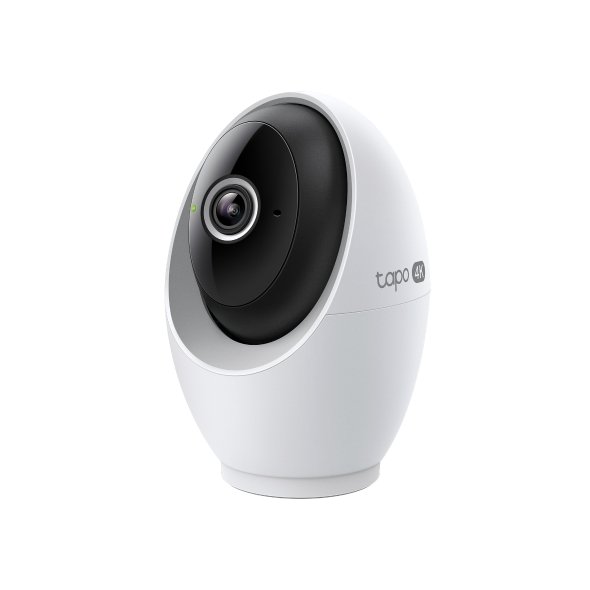
Short answer: Tapo C260 is worth considering for indoor cat owners who want a general-purpose camera with local storage. Its strengths on paper do not establish real-world tracking accuracy. Buy for the recording and privacy functions you need, then test the setup during the return period.
Research-based guide. We reviewed manufacturer specifications and purchase information on September 13, 2026. We have not hands-on tested these cameras. Features vary by hardware version, region and firmware.
Affiliate disclosure: MeowBay may earn a commission from paid links at no extra cost to you. As an Amazon Associate, we earn from qualifying purchases.
TP-Link lists 4K video, pan-and-tilt tracking, two-way audio, physical privacy mode and 2.4/5 GHz Wi-Fi. Recording can use a separately purchased microSD card up to 512 GB, or a Tapo Care subscription. These are manufacturer specifications, not MeowBay test results.
The US specification table includes cat-meow detection. That should not be interpreted as an independently verified alarm for distress. Hardware, firmware and regional availability matter; verify the option in your own app.
Who should consider it?
You want to revisit an event: make saved footage your first setup priority.
You want one room covered: choose a mounting position with a useful view of the routes your cat actually uses.
You want a visible privacy control: confirm that the privacy function behaves as expected before placing the camera in a shared room.
Look elsewhere if your non-negotiable requirement is verified recognition of each individual cat. Human face recognition should not be confused with identifying pets by name. The manufacturer also notes regional restrictions on its face-recognition feature.
Local storage: what to check before buying a card
Match the card to the current manual and compatibility guidance for the delivered hardware. Include the card in your total budget. After installation, format it through the supported process and play back a recent recording. Do not assume that installing a card starts the schedule you intended.
Choose between continuous and event-based recording according to what you need to review. A short event clip may not show what happened before the trigger. Review your settings periodically and save any clip you need to keep before it is overwritten. A card inside a camera can also be lost with the device, so think about whether an optional backup is useful.
A cat-owner placement checklist
Start with a stable surface and route the power cable out of reach.
Include a useful floor area instead of filling the frame with furniture.
Avoid aiming directly at a bright window.
Check whether a sofa or doorway hides the area you wanted to monitor.
Try talking through the speaker while you are home and stop if your cat reacts poorly.
A rotating lens does not remove physical blind spots. If your cat spends time in several closed rooms, draw the layout before deciding whether one device is sufficient.
Seven checks during the return period
Verify live view from your normal phone connection; retrieve a recording; walk through the monitored area; watch how the camera follows your cat; inspect a night clip; test privacy mode; and check the notification volume over a normal day. These are suggested owner checks, not tests MeowBay has completed.
Start with fewer notification categories. Add an alert only if it helps you make a meaningful decision. Receiving more notifications is not the same as having better information.
C260 or PETLIBRO Scout?
Scout is the alternative to research if pet-focused activity organization matters more than local storage. Compare that advantage with its subscription and storage limits in our Scout vs C260 guide. For a simpler model, see our Kasa EC70 review.
Verify a local recording before relying on the card
A card being detected is not the same as a usable video being stored. Follow the C260 hardware-version documentation and keep a simple playback record.
Decision or record
How to apply it
Setup
Supported card, recording mode, correct time and the intended view.
Record
Create an ordinary harmless event while someone is home; do not test by disturbing the cat.
Retrieve
Find the actual clip or timeline segment and verify that the needed action is visible.
Repeat the relevant check after replacing the card or changing recording settings. Do not format a card that contains footage you still need to preserve; copy or export important material before following support instructions.
Frequently asked questions
Does a camera replace a cat sitter?
No. Arrange someone who can physically help your cat. A clear picture cannot deliver care.
Does “local storage” guarantee local-only operation?
No. Storage, remote access, account services and notifications are separate questions. Review the privacy settings and service terms for the functions you enable.
What should I check on Amazon?
Confirm C260 in the title and model details, the seller, condition, power adapter, bundle contents and return terms. Avoid assuming that a similar-looking Tapo camera has the same capabilities.
Choose C260 for a recording requirement you can verify
Write the event or period you want to revisit. A general view of the room, a saved feeding event and a continuous timeline are different requirements. The useful setup is the one that lets you retrieve the relevant evidence under the actual model and service conditions.
Keep the delivered hardware identity
Save the label and regional support page before choosing a card or copying a setup guide. A similar Tapo product or another hardware revision can have different limits. Do not buy accessories from the most generous specification you find.
Use the current manual for installation, storage preparation and supported placement. Keep the account and ordinary care instructions understandable to the person who may need to inspect the home.
A local-recording acceptance check
While someone is home, verify a harmless ordinary event at the location you care about. Use the selected supported recording mode. Retrieve the saved period afterward and compare the actual image with the event the person observed.
Stage
Question to answer
Storage recognized
Does the current app show the supported card and normal status?
Recording configured
Does the selected mode cover the intended time or event?
Evidence retrieved
Can the actual clip or timeline segment be played?
Action visible
Is the relevant bowl, route or behavior unobstructed?
Evidence preserved
Can the needed material be exported before ordinary overwrite?
Keep the checks separate. Recognized storage is not a playback result. A moving timeline marker is not proof the bowl is visible. An alert is not the same as a saved continuous period.
Do not format away the question
If a card already contains material you need, preserve it through the supported route before following a formatting or reset procedure. A maintenance step can change what remains available. Do not make repeated destructive changes the first response to missing footage.
Keep the relevant error, recording mode and time with a support request. The recording checklist helps separate storage, schedule and view problems.
Frame the action at cat level
A room can look well covered from a standing person’s perspective while a sofa hides the cat’s route. Include the actual approach to the resource and check ordinary furniture positions. Pan-and-tilt movement does not see through an obstruction.
For a feeding question, keep the bowl and identifying markings visible where possible. A clear face followed by a hidden body does not establish consumption. Use appropriate individual feeding observations when exact intake matters.
Check night conditions independently
Review a saved ordinary night clip rather than assuming the daytime result transfers. Look for reflections, foreground brightness and hidden areas. Use supported placement and lighting adjustments without disturbing the cat to create a demonstration.
A change in light can change the visible evidence without proving a camera fault. Keep that context with the clip and use the placement guide for the room walkthrough.
Separate local recording from remote services
Decide how footage is stored, how you reach it away from home and which notifications or optional cloud functions you enable. One answer does not settle the others. A card in the camera is not a promise that every remote feature works without an internet connection.
If a specific offline behavior is decisive, ask support about the exact hardware and current firmware. Save the answer instead of borrowing a general rule from another TP-Link camera.
Budget the complete wanted arrangement
Include the compatible card, supported mounting and any chosen service. Use actual selected-region prices and renewal terms. A trial’s features should not be treated as the permanent no-renewal feature set.
A higher capacity card can be useful only within the model’s supported limit and your recording needs. It does not establish a fixed retention period for every resolution, mode or event pattern.
Use alerts as prompts for a check
Choose a notification category only when you know what action it supports. Review actual events before relying on an automated label. No alert does not prove that every important event was absent.
A sound or pet category is not a diagnosis. Seek appropriate veterinary advice for a concerning change in the cat rather than waiting for the camera to classify it.
Make the final purchase decision during the applicable trial
Evaluate useful framing, successful playback, manageable notifications, supported privacy behavior and the caregiver response. Keep unresolved items visible before the deadline. One impressive live image does not complete the recording requirement.
If C260 meets the household’s actual requirement, there is no need to add optional services for their own sake. If the decisive gap remains, adjust the supported setup or use the applicable support or return route rather than declaring the specification list a successful purchase.
Keep a missing clip separate from a missing stream
If live viewing works but a saved period is absent, begin with the documented storage, schedule and retrieval checks. If neither works, the relevant question may involve power, connection or account access. Record the actual state rather than changing every setting at once.
Keep the date, time and visible error before a reset. A reset may alter the configuration you need to explain. Follow the model-specific support sequence and preserve any important available footage before destructive storage maintenance.
Verify the ordinary case after correction
If a schedule setting was corrected, retrieve a new ordinary segment from that schedule. A working live view still checks a different function. If a card was replaced, verify recognition and actual playback again under the current instructions.
Do not call the issue resolved only because an error disappears. The relevant result is the wanted action visible in the recording you can retrieve. Keep any remaining gap in the caregiver note so a later person does not assume the system is providing evidence it has not yet demonstrated.
Sources and research method
Our judgments compare documented capabilities with practical cat-owner needs. Manufacturer claims are not independent measurements. We do not assign test scores or guarantee detection accuracy.
It is a candidate for owners who want memory-card recording instead of paid cloud storage. Confirm the exact recording modes, compatible card and app requirements for the unit you buy. A local card does not mean the camera works entirely offline or that every optional feature is free.
Maya Bennett is MeowBay’s Cat Product Research Editor and is responsible for this research-led article. She evaluates manufacturer documentation, household fit, cleaning, and product limitations. This article does not replace advice from your veterinarian.
1 Comment on “Tapo C260 Review for Cats: Local Storage, Privacy and Buying Checks”



1 Comment on “Tapo C260 Review for Cats: Local Storage, Privacy and Buying Checks”